Introduction#
Fastr is a system for creating workflows for automated processing of large scale data. A processing workflow might also be called a processing pipeline, however we feel that a pipeline suggests a linear flow of data. Fastr is designed to handle complex flows of data, so we prefer to use the term network. We see the workflow as a network of processing tools, through which the data will flow.
The original authors work in a medical image analysis group at Erasmus MC. They often had to run analysis that used multiple programs written in different languages. Every time a experiment was set up, the programs had to be glued together by scripts (often in bash or python).
At some point the authors got fed up by doing these things again and again, and so decided to create a flexible, powerful scripting base to easily create these scripts. The idea evolved to a framework in which the building blocks could be defined in XML and the networks could be constructed in very simple scripts (similar to creating a GUI).
Philosophy#
Researchers spend a lot of time processing data. In image analysis, this often includes using multiple tools in succession and feeding the output of one tool to the next. A significant amount of time is spent either executing these tools by hand or writing scripts to automate this process. This process is time consuming and error-prone. Considering all these tasks are very similar, we wanted to write one elaborate framework that makes it easy to create pipelines, reduces the risk of errors, generates extensive logs, and guarantees reproducibility.
The Fastr framework is applicable to multiple levels of usage: from a single researcher who wants to design a processing pipeline and needs to get reproducible results for publishing; to applying a consolidated image processing pipeline to a large population imaging study. On all levels of application the pipeline provenance and managed execution of the pipeline enables you to get reliable results.
System overview#
There are a few key requirements for the design of the system:
Any tool that your computer can run using the command line (without user interaction) should be usable by the system without modifying the tool.
The creation of a workflow should be simple, conceptual and require no real programming.
Networks, once created, should be usable by anyone like a simple program. All processing should be done automatically.
All processing of the network should be logged extensively, allowing for complete reproducibility of the system (guaranteeing data provenance).
Using these requirements we define a few key elements in our system:
A
fastr.Toolis a definition of any program that can be used as part of a pipeline (e.g. a segmentation tool)A
fastr.Nodeis a single operational step in the workflow. This represents the execution of afastr.Tool.A
fastr.Linkindicates how the data flows between nodes.A
fastr.Networkis an object containing a collection offastr.Nodeandfastr.Linkthat form a workflow.
With these building blocks, the creation of a pipeline will boil down to just specifying the steps in the pipeline and the flow of the data between them. For example a simple neuro-imaging pipeline could look like:
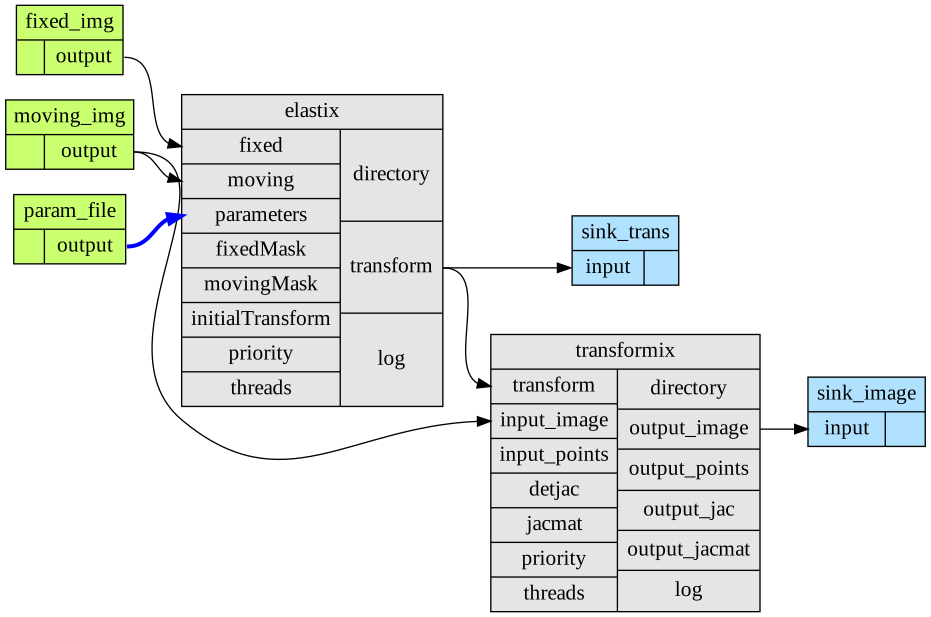
Fig. 1 A simple workflow that registers two images and uses the resulting transform to resample the moving image.#
In Fastr this translates to:
Create a
fastr.Networkfor your pipelineCreate a
fastr.SourceNodefor the fixed imageCreate a
fastr.SourceNodefor the moving imageCreate a
fastr.SourceNodefor the registration parametersCreate a
fastr.Nodefor the registration (in this case elastix)Create a
fastr.Nodefor the resampling of the image (in this case transformix)Create a
fastr.SinkNodeto save the transformationsCreate a
fastr.SinkNodeto save the transformed imagesfastr.Linkthe output of the fixed image source node to the fixed image input of the registration nodefastr.Linkthe output of the moving image source node to the moving image input of the registration nodefastr.Linkthe output of the registration parameters source node to the registration parameters input of the registration nodefastr.Linkthe output transform of the registration node to the transform input of the resampling nodefastr.Linkthe output transform of the registration node to the input of transformation SinkNodefastr.Linkthe output image of the resampling node to the input of image SinkNodeRun the
fastr.Networkfor subjects X
This might seem like a lot of work for a registration, but the Fastr framework manages all other things, executes the pipeline and builds a complete paper trail of all executed operations. The execution can be on any of the supported execution environments (local, cluster, etc). The data can be imported from and exported to any of the supported data connections (file, XNAT, etc). It is also important to keep in mind that this is a simple example, but for more complex pipelines, managing the workflow with Fastr will be easier and less error-prone than writing your own scripts.